

The training tool by Smart Lions
Learnlog: your training plan and social balance sheet. Done, without Excel.
Record every training once. Learnlog tracks the training entitlement per joint committee, has your training plan ready by 31 March and adds up the social balance sheet figures with every annual accounts filing.
No credit card · account in 2 minutes · after 30 days the training plan, entitlement and social balance sheet stay free. You register on smartlions.me, the app behind Learnlog.
What the law asks, in one record

Training plan
The training plan is ready, entitlement already deducted
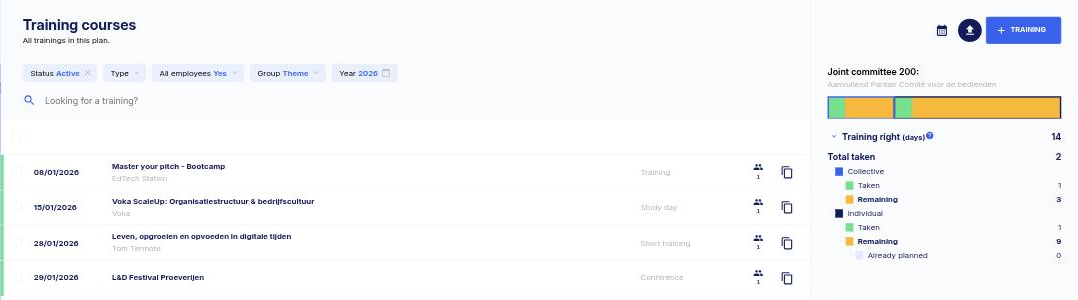
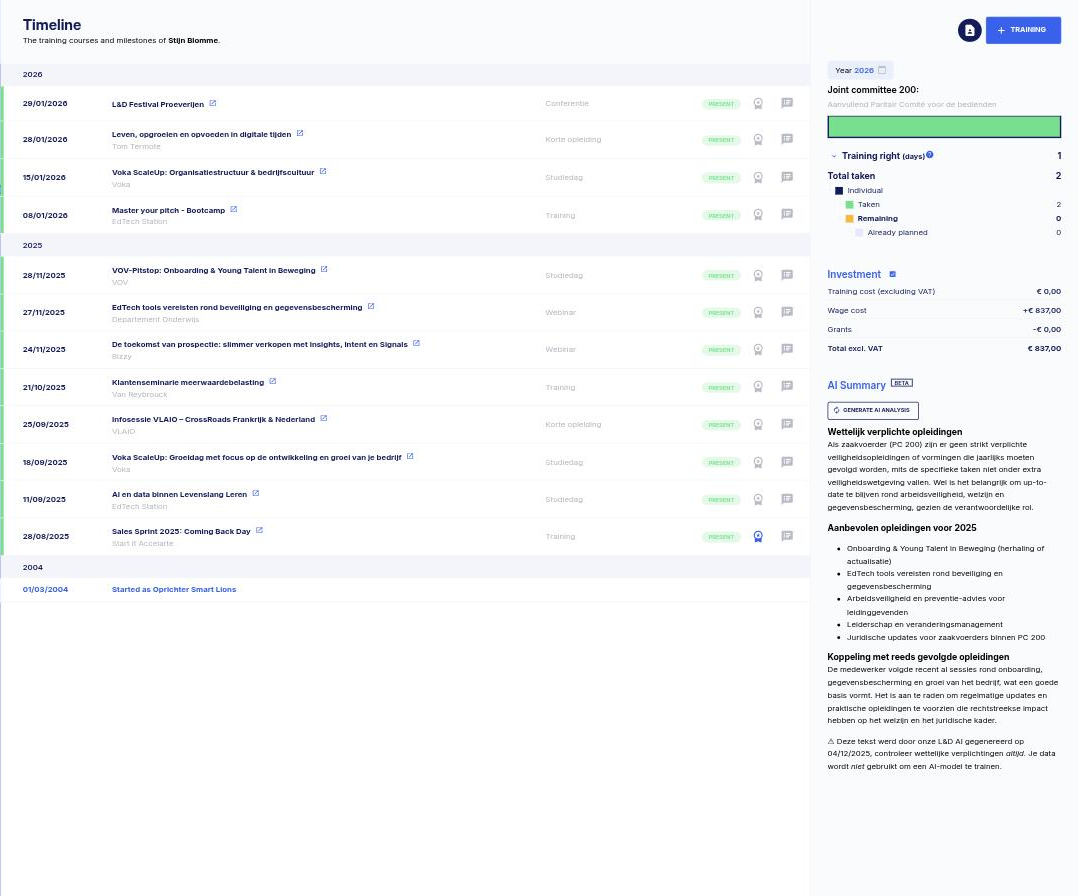
Every planned and completed training sits in the right place: per employee and per joint committee. The entitlement is deducted automatically, so you see at a glance who still has days left.
- Export the plan for your works council or union delegation, and the mandatory copy for the FPS Employment
- Import your employees from Excel or your payroll provider
- The entitlement per joint committee, collective and individual, is tracked live in days
- Employees request training themselves, you approve
Social balance sheet
The training figures for the social balance sheet, no arithmetic
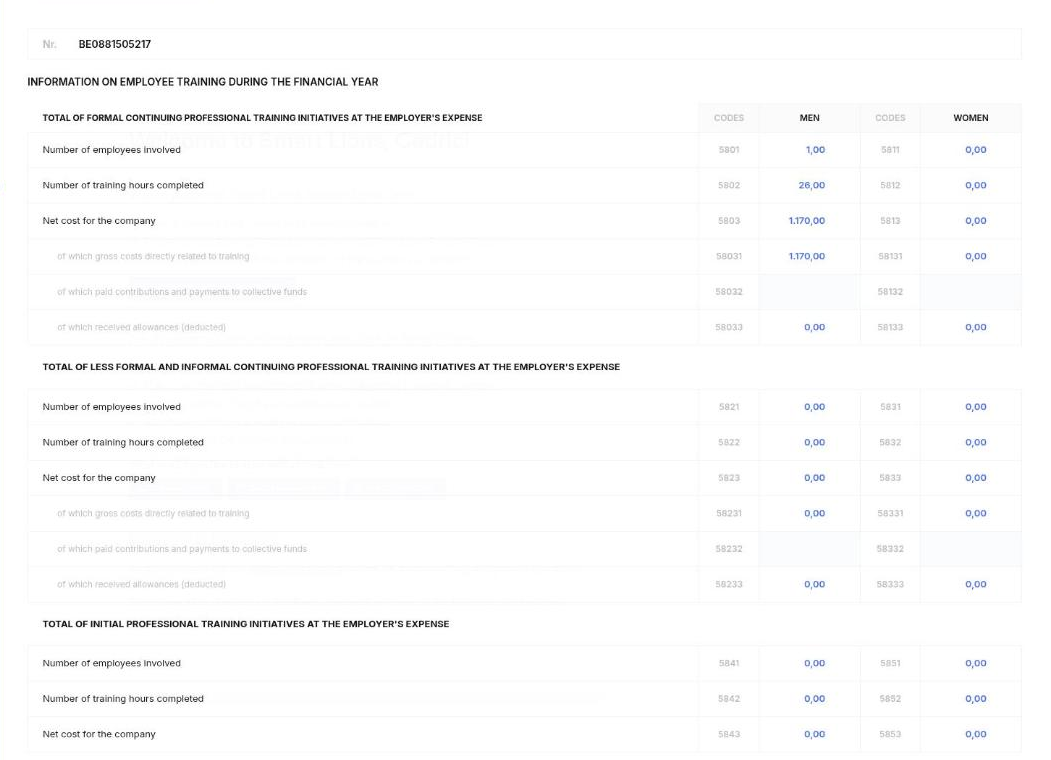
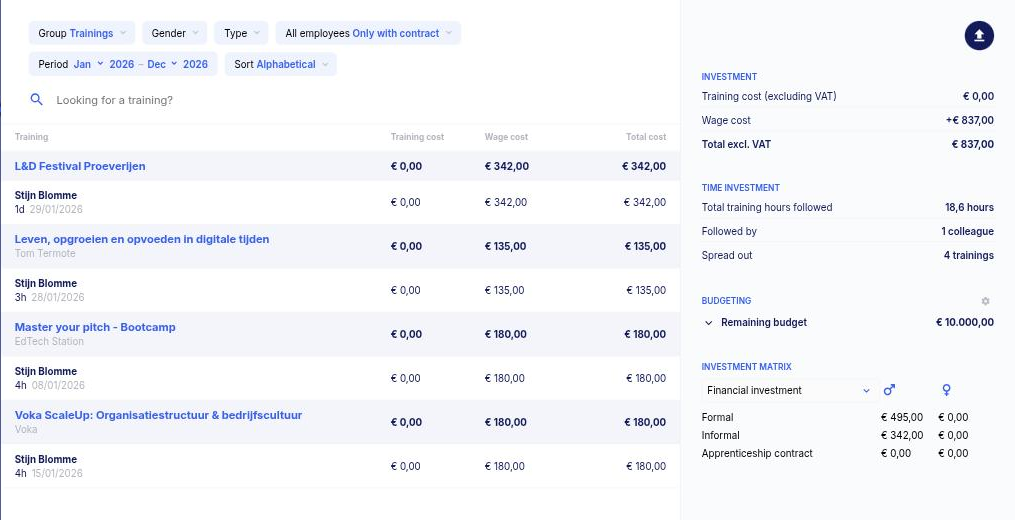
Your accountant prepares the social balance sheet, but the training figures come from you: participants, hours and net cost by gender, for formal, informal and initial training. Learnlog adds them up all financial year in the layout of the social balance sheet. By the time your accountant asks, the answer is ready.
- Every completed training, formal and informal, counts automatically
- Participants, hours and net cost by gender, per heading and code of the social balance sheet (5801 to 5853), as you file them with the NBB
- One export, ready for your accountant or payroll provider
Who did what, and what does it cost?
The same record fills each employee's timeline, the certificates and your cost overview. Nothing entered twice.
-
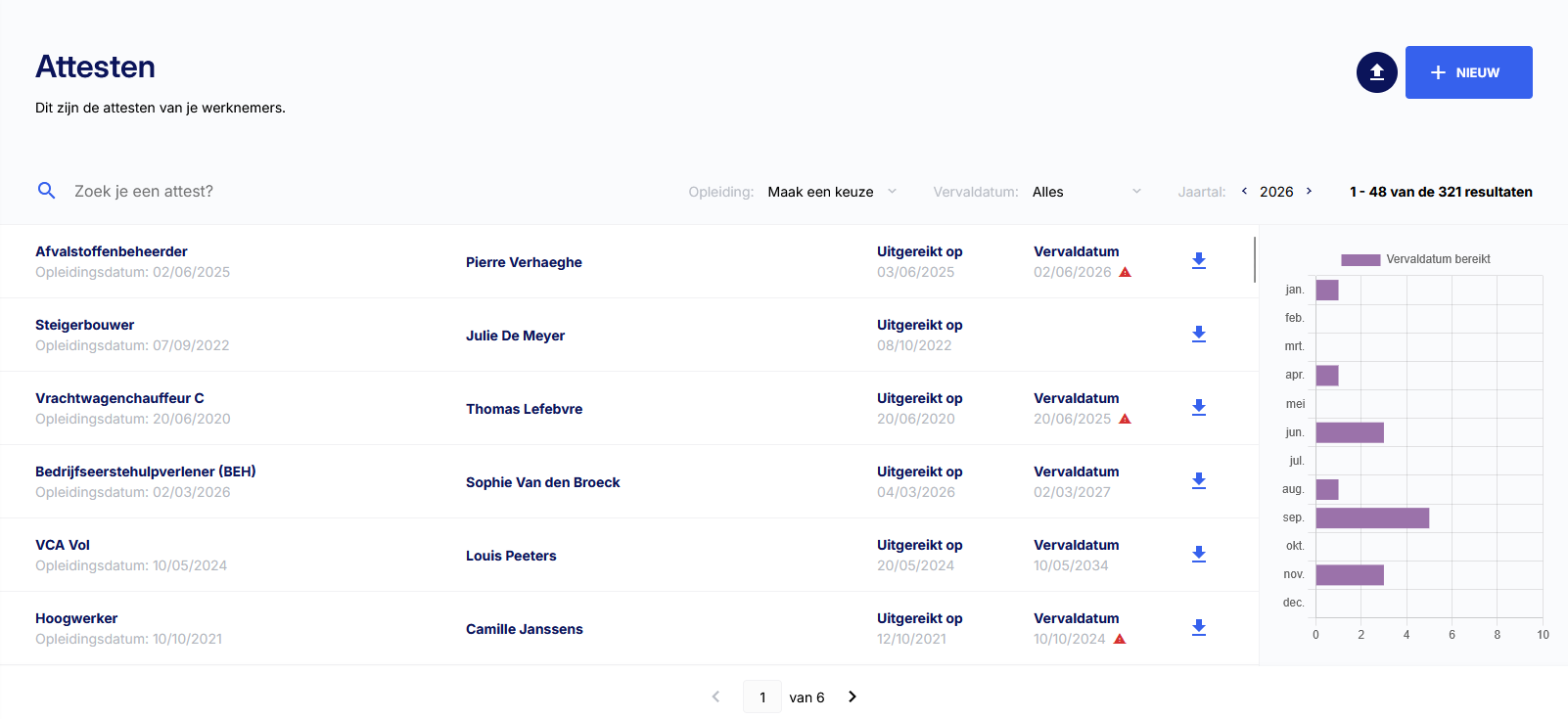
Certificates with expiry datesVCA, forklift, BA4/BA5, first aid: every certificate in one place, with a monthly view of what expires. From Standard you get a reminder before a certificate lapses.
-
Training CV per employeeEach employee's timeline: completed training, certificates and entitlement, as an export. For an appraisal or an audit.
-
What does training really cost you?Training cost and the wage cost of training hours, per course and per employee. With an annual budget and the formal/informal investment matrix by gender.
-
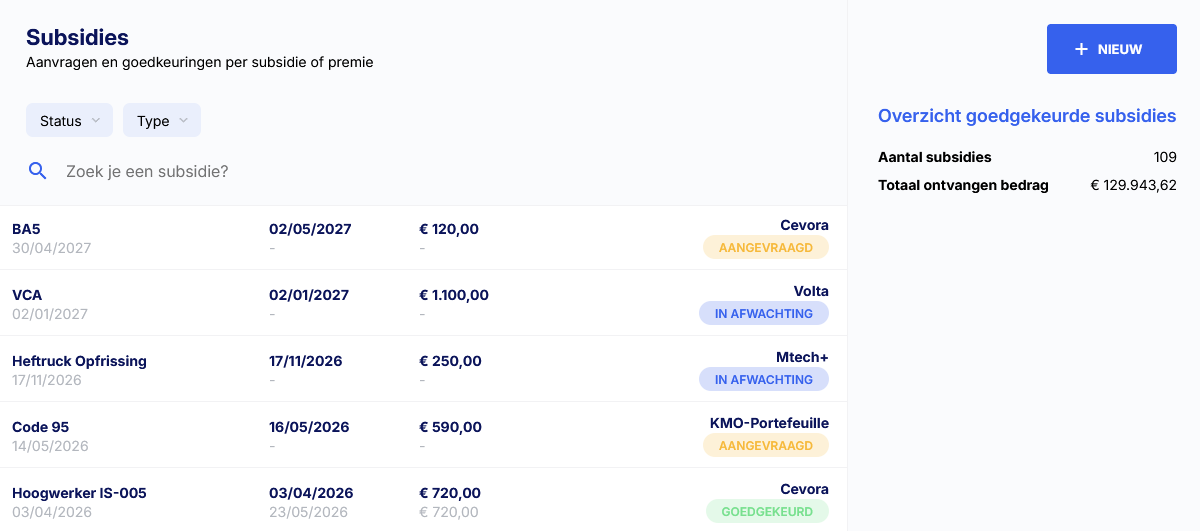
Grants and subsidiesSME e-wallet, sector funds, Flemish training leave reimbursement: applications and approvals in one place, with the total you already received. From Standard.
Up and running in an afternoon
Create your account
Two minutes, no credit card. A three-step checklist (employees, training, certificates) takes you from an empty account to a working file.Import your employees
From Excel, or automatically through the connection with your payroll provider (Acerta, SD Worx, Securex, Partena, Attentia) or HR software. Have ready: name, joint committee, working-time fraction, gender and start date.Your plan and figures are ready
Right after the import you see each employee's remaining entitlement. Every new training then counts automatically in the plan and the social balance sheet.
Connect your payroll provider (social secretariat) or HR software
Your payroll provider keeps doing payroll. Learnlog pulls your employees from it and syncs training and hours: Acerta, SD Worx, Securex, Partena, Attentia and your HR software. No double entry, no more Excel exports.



You track the filing of your training plan with the FPS Employment (FOD WASO) in Learnlog (from Standard). Own software? There is an FTP import (Standard) and an API (Professional). Questions about a connection? We'll help you out.
Smart Lions Academy
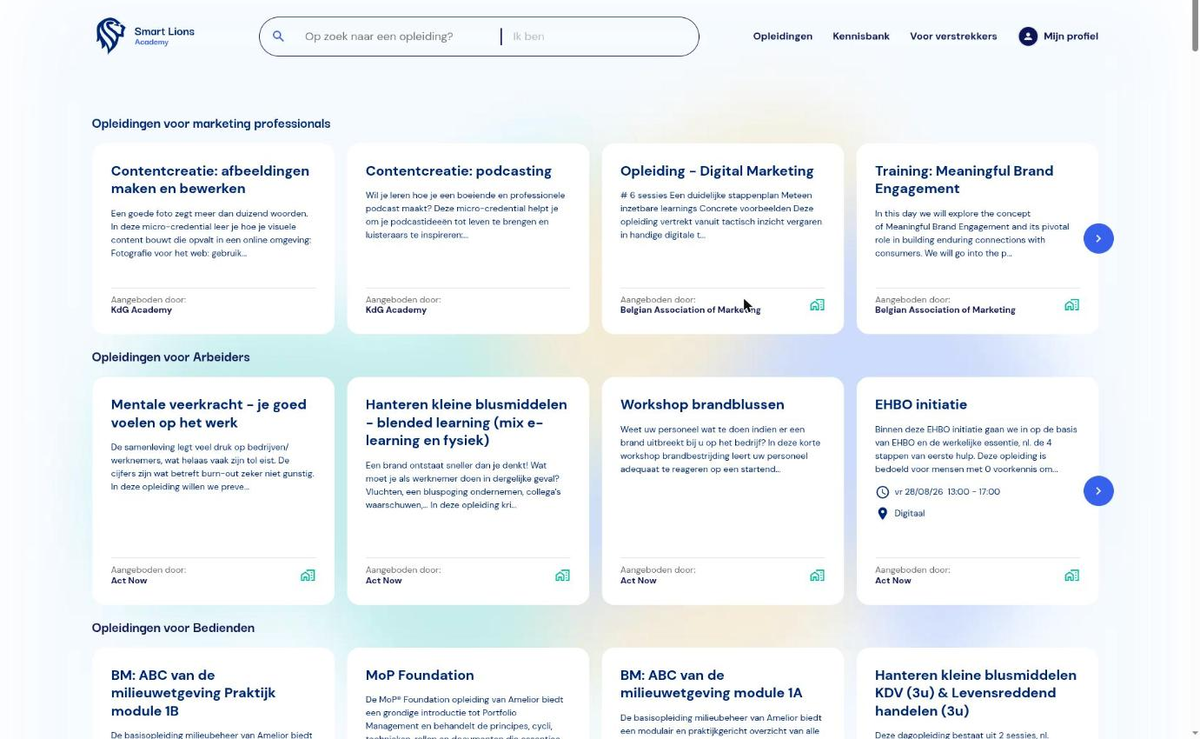
Need a course? Search, book and add it to your plan.
Learnlog is more than record-keeping. Through the Smart Lions Academy you find and book training from recognised providers, filtered by your joint committee. What you book, you import into your training plan yourself: no double entry, and the hours count straight away for the entitlement and the social balance sheet.
- Over 2,500 courses from recognised providers, by sector and joint committee
- Searching and booking is free; you enrol through Smart Lions or directly with the provider
- Your connected providers and their enrolments show up in Learnlog; what you book through the academy, you import into your plan yourself
- Recognitions shown where applicable: sector fund, SME e-wallet, Flemish training leave
From Excel to Learnlog
Videos only load when you press play.
What users say
“Good to see the financial overview as well, in preparation for the social balance sheet.”
“It is a handy and clear tool in which we can also track a few KPIs. I like working with it because it is simple to use and counts the sector days automatically…”
“It is a very easy and user-friendly programme. We are always well guided and get an answer to our questions: really well followed up.”
Start free. Pay when you want more.
You start 30 days in the full application. Then you drop back to Free automatically: your data stays and you pay nothing until you pick a plan yourself.
Free
€0
for every company size, no time limit
Unlimited employees and training, training plan, entitlement per joint committee, social balance sheet figures, employee requests, budget module, training CV, certificates in one place, link to the training catalogue, Excel import and export, email support.
Standard
€10 to 130
per month, by your number of employees, excl. VAT. You see your exact price in the app before you choose.
Plus subsidy tracking, reminders for expiring certificates, teams and sites, tracking of your FPS Employment filing and phone support.
Professional
€45 to 580
per month, by your number of employees, excl. VAT. You see your exact price in the app before you choose.
Plus attendance, evaluation forms, attachments, certification matrix, API and free onboarding and integration service.
Member of mtech+ (JC 111 or 209)? Your career fund offers the same application for €20 per month, first 4 weeks free. Start via mtech+ →
Still have to sell it internally? Convince your management in five minutes →
Frequently asked questions
Is Learnlog really free?
Yes. For the first 30 days you use the full application. On day 31 you drop back to Free automatically, for every company size: your data and records stay, only the paid features lock. Nothing is ever charged automatically.
What if we want to stop or downgrade?
You can cancel at any time. Paid plans run per year: you keep the paid features until the end of the year you paid for, after which the account switches to Free automatically. The remaining part is not refunded. Nothing is lost: your employees, training, certificates and reports stay in the system and you can export everything.
Why do I end up on smartlions.me?
Learnlog is the training tool of Smart Lions (Webdoos BV, Bruges). Your account and your data live on smartlions.me. Learnlog is the same application, under its own name.
I already use Learnlog through mtech+. Do I need to register again?
No. mtech+ learnlog and Learnlog are the same application. Log in with your existing account on smartlions.me.
Does it work for our joint committee?
Yes. You pick the joint committee per employee and set your sector's entitlement per committee. Learnlog then keeps the balance per employee, collective and individual. Several joint committees in one company is fine.
Our payroll provider or accountant prepares the social balance sheet. Why Learnlog?
They prepare the annual accounts, but the training section needs figures only you have: who took which course, how many hours, at what cost, formal or informal, male or female. Learnlog adds those up all year. You send one export instead of digging through your inbox and Excel at year-end close.
How do you draw up a training plan?
A training plan lists the formal and informal training you plan for your employees in the coming year. From 20 employees you draw it up every year by 31 March, after advice from the works council or union delegation, and send a copy to the FPS Employment. In Learnlog you record each planned training once, per employee and per joint committee; the training plan follows automatically and exports in one click.
Which training figures go into the social balance sheet?
In the training activities section of the social balance sheet you report, by gender, the number of participants, the number of training hours and the net cost, separately for formal, informal and initial training. Learnlog adds up those figures from everything you recorded during the financial year and presents them in the layout of the social balance sheet, ready for your accountant.
How do you track the training entitlement per employee?
For each employee you record the joint committee and the working-time fraction. Learnlog calculates the annual entitlement in days from that and deducts every completed or planned training. You see per employee and per joint committee what was taken, what is planned and what remains.
Does Learnlog connect to our payroll provider (social secretariat)?
Yes. Learnlog connects to Acerta, SD Worx eBlox, Securex HRAccent, Partena and Attentia Dots, and to HR software such as Officient, Personio, Protime, SAP SuccessFactors, Workday, BambooHR, HiBob, Deel and Afas. Employees, training and training hours sync automatically. The FPS Employment (FOD WASO) connection (from Standard) tracks the filing of your training plan. For your own software there is an FTP import (Standard) and an API (Professional).
Can we also book training through Learnlog?
Yes. The Smart Lions Academy brings together over 2,500 courses from recognised providers, filtered by sector and joint committee. Searching and booking is free; you enrol through Smart Lions or directly with the provider. What you book, you import into your training plan yourself, so the hours count straight away for the entitlement and the social balance sheet. The catalogue is also open without an account at smartlions.academy.
We have fewer than 20 employees. Is this for us?
The training plan is only mandatory from 20 employees, but from 10 employees the training entitlement already applies (1 day a year), and every company that files annual accounts and employs staff completes the social balance sheet, however small. And if you grow, your records are already in order.
What about the Federal Learning Account?
The Federal Learning Account has been abolished since 1 January 2026. There is no legal registration tool anymore, but the training entitlement, the training plan and the social balance sheet remain, and you still want to know who took how many days. Learnlog is the alternative: one record per training, every report follows from it.
Can we import our existing Excel?
Yes. Employees are imported from Excel or your payroll provider's export file; training underway and completed is added with the same import. Most companies are up and running in an afternoon.
Where is our data stored?
In the European Union, by default. Learnlog is built in Belgium by Smart Lions (Webdoos BV, Bruges) and hosted in the EU. Your data stays yours: you can export everything at any time.

No Excel next year.
Start today, import your employees and have a correct training plan in March and a social balance sheet you no longer need to reconstruct.
No credit card. Worst case, you simply keep using Learnlog for free.
Rather ask a question first? hello@smartlions.email